
Turn long recordings into short, captioned vertical clips for Shorts, Reels and TikTok with an AI agent as your editor.
Simply drop your video into Raw/. Clipsmith finds the best 20–60 second moments, cuts them, optimizes framing and adds captions. Everything runs locally on your computer. No API key required.
What you get
- 4:5 vertical clips (1080×1350 by default) that follow whoever is speaking. Faces are tracked, and audiovisual speaker detection (Light-ASD) decides who is talking.
- Word-by-word highlighted captions, transcribed locally with Whisper.
- Clean cuts that never split a word or flash a few frames of the neighbouring camera shot, with loudness normalisation and soft audio fades.
- A clip editor in your browser to approve or reject clips, move edges, fix framing and correct caption words.
- Music edits of the clips you choose: the dialogue up to the payoff line, a drop on your own music, and a black-and-white or warm montage cut on every beat. Each edit comes with and without the music.
Requirements
- Python 3.12 or newer (tested with 3.13)
- FFmpeg, with
ffmpegandffprobeon your PATH - An AI coding agent that can run commands in this folder
The first run creates a local .venv and installs everything else. It also downloads the Whisper model once (about 1.5 GB). An NVIDIA GPU is optional: when nvidia-smi is available, the first run also installs the CUDA libraries for transcription (about 1.25 GB), and transcription and encoding run on the GPU.
Quick start
-
Clone the repository and open the folder in your AI agent.
git clone https://github.com/schyro/Clipsmith.git
-
Copy one or more recordings into the
Raw/folder. Create the folder if it is not there. -
Tell the agent: "I added videos to Raw."
The agent follows AGENTS.md. It prepares transcripts, chooses the clips, renders them, checks the results and gives you the file paths. Finished clips are saved in Output/<recording>/<profile>/.
Running it yourself
run.cmd (Windows) and run.sh (macOS/Linux) take the same options:
./run.cmd --prepare-review     # transcribe and build review material for the agent
./run.cmd --require-reviewed   # render clips from the agent's reviewed plans
./run.cmd --review-gallery     # open the clip editor
./run.cmd --apply-review       # apply your editor decisions
./run.cmd --scan-music         # detect tempo and drop of the tracks in Music/
A plain ./run.cmd with no options picks clips with a simple keyword heuristic. It is a rough fallback; the agent does a far better job.
Reviewing clips
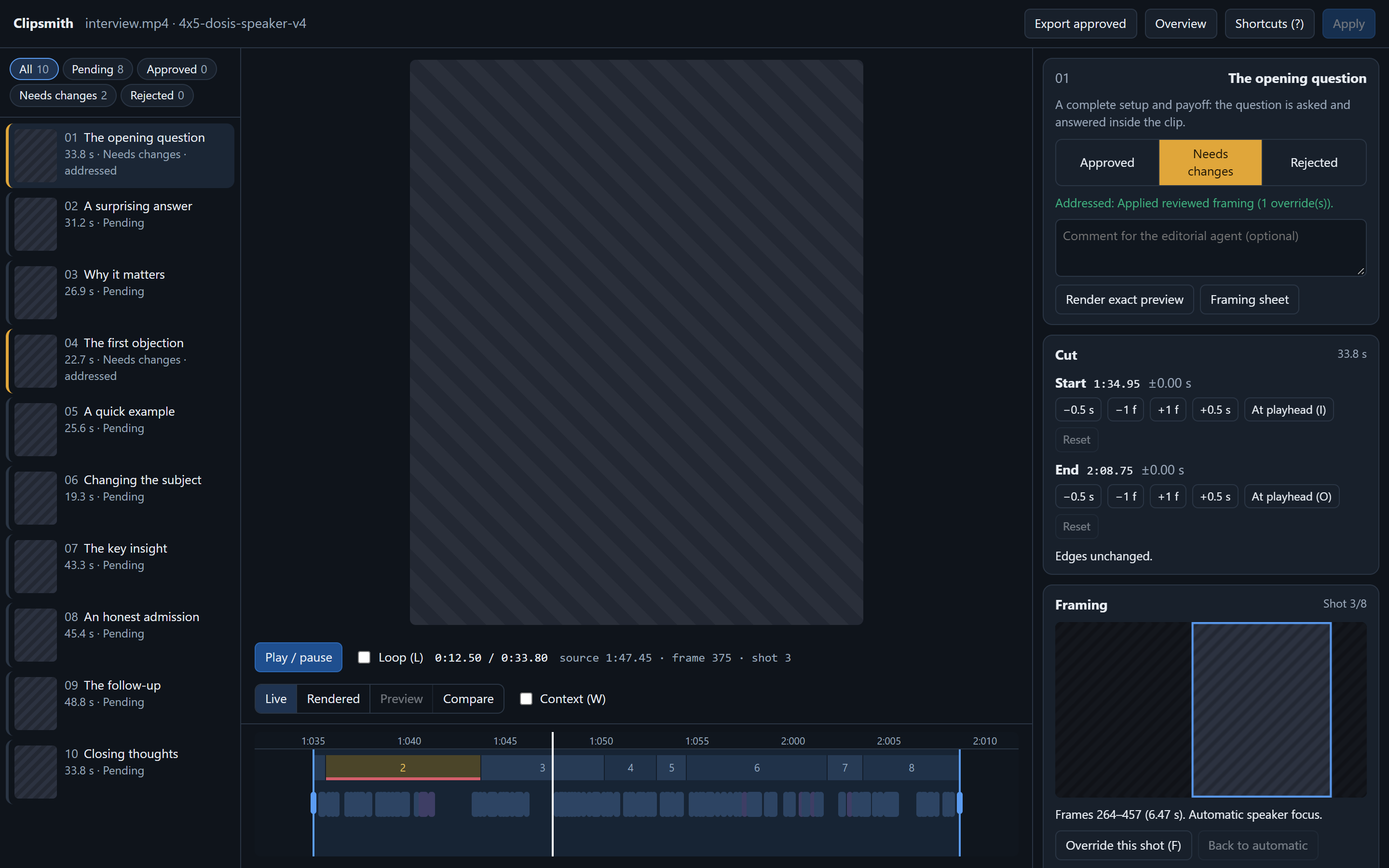
./run.cmd --review-gallery opens the editor in its own window (http://127.0.0.1:8765/editor/). The agent's candidates come first, before anything is rendered: play each from a low-resolution preview with live captions, then keep it (K) or reject it (X, then a number for the reason). Apply renders only the kept ones. For each rendered clip you can:
- approve it, reject it or ask for changes, with a comment or notes pinned to moments on the timeline
- move the start and end (cuts snap to word boundaries)
- set the framing per camera shot
- fix, retime, add or re-transcribe caption words, choose where a caption line breaks, and find and replace words across the whole source
- step through flagged shots and low-confidence words, zoom the timeline with Ctrl + mouse wheel, and undo any edit
Press Apply to re-render the changed clips, or ask the agent to apply your review. The agent handles your comments and notes. Export approved copies the approved clips to a ready/ folder.
Full guide: docs/clip-editor.md.
Settings
Output size, caption font, size, position and colour, fades and speaker-switch timing are set in video_settings.json. Change the profile name when you change settings, so earlier exports are kept. The agent treats this file as your preference.
Learn more
- docs/framing.md: how speaker framing works, and the plan file format
- docs/clip-editor.md: the editor and the review decisions file
- docs/edits.md: music edits, the
Music/sidecars and the edit checks - docs/reference.md: all commands, caption corrections, caching and tests
- examples/plan.example.json: an example clip plan
Privacy
Videos never leave your machine: transcription, face tracking and rendering all run locally. Your own recordings, plans and outputs (Raw/, Plans/, Output/, Review/, work/) are git-ignored.
License and credits
Clipsmith is released under the MIT License. It bundles or uses:
- Light-ASD (MIT), in
third_party/light_asd; seePROVENANCE.mdthere - OpenCV YuNet face detector; licence in
assets/licenses/LICENSE-YuNet.txt - Dosis font (SIL OFL); licence in
assets/licenses/OFL-Dosis.txt - IBM Plex Sans and IBM Plex Mono fonts for the clip editor (SIL OFL); licence in
assets/licenses/OFL-IBM-Plex.txt - faster-whisper, FFmpeg, and Preact with htm (vendored in
editor/vendor/)